
Speech Analytics for Call Centers: Turning Recorded Calls Into QA and Revenue Signals
By Troy Van WillisLast modified: December 22, 2026
Voted Top Call Center for 2024 by Forbes
Virtual Receptionists
Save time and money with our virtual receptionists.
AI Receptionist
AI-powered receptionist that answers, routes, and qualifies calls 24/7.
Enterprise Solutions
Solutions designed to scale with your organization’s needs.
Legal Services
Our virtual legal receptionists are experts in legal intake.
Last modified: December 22, 2026
Recorded calls contain the clearest evidence of what your operation is doing well, where it is drifting, and which conversations create or lose revenue. The challenge is that high-volume teams rarely have the time to listen manually at the depth required to improve quality, compliance, intake consistency, and conversion.
This guide is for service leaders, QA managers, intake teams, and revenue owners who need more value from recorded conversations. You will learn what call center speech analytics is, how recorded calls become usable QA and revenue signals, which signals matter most, how to evaluate speech analytics software, and how to roll it out without adding another dashboard nobody owns.
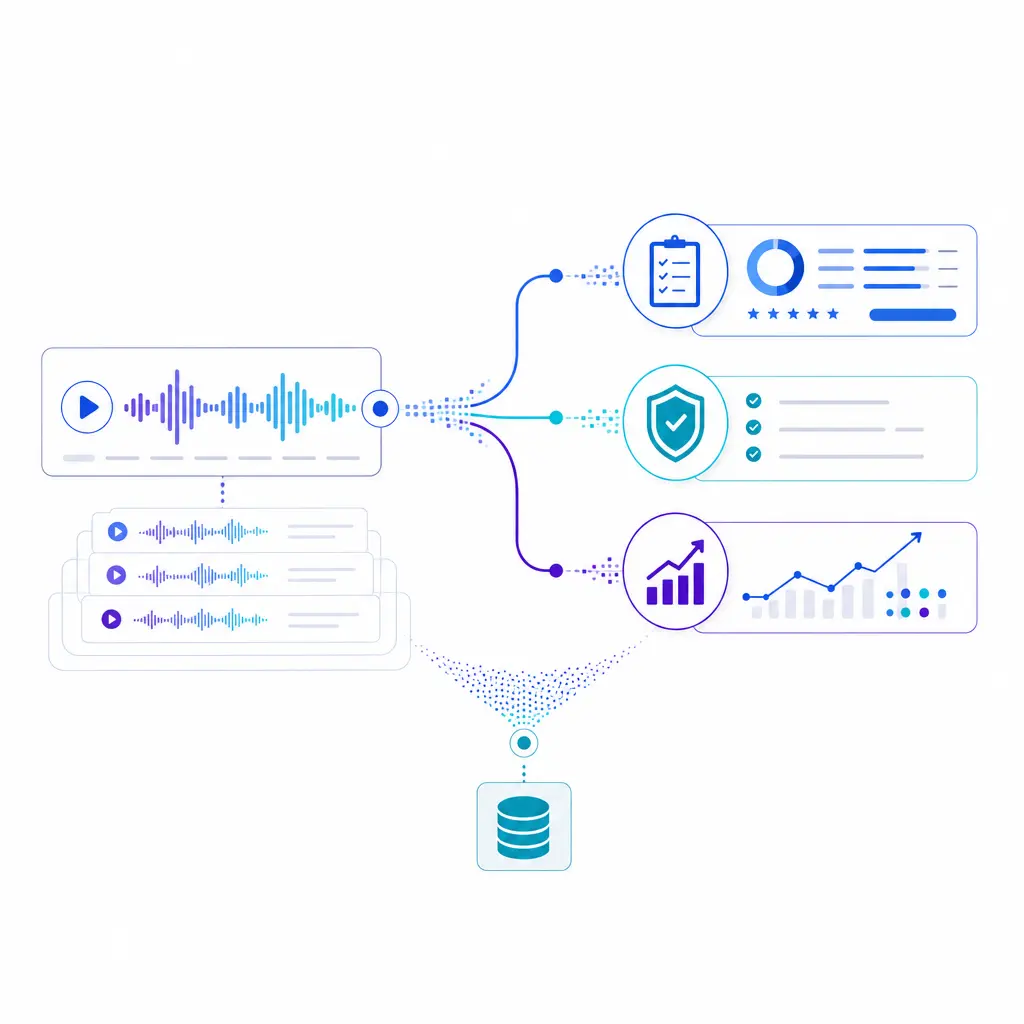
Recorded calls hold clear evidence of what your operation does well, where it drifts, and which conversations win or lose revenue. Speech analytics turns that audio into QA, compliance, and revenue signals your team can act on.
Many teams still use recordings mainly for storage, spot checks, and dispute review. Today, Google Contact Center AI Insights and Amazon Transcribe Call Analytics show how modern platforms can turn calls into transcripts, categories, trends, and conversation characteristics such as sentiment, interruptions, talk speed, and non-talk time.
That shift matters operationally. Speech analytics is no longer just a reporting layer for contact centers. It is becoming a practical operating tool for QA coverage, coaching, intake quality, escalation prevention, and revenue follow-up across enterprise service teams, legal intake workflows, healthcare scheduling environments, and overflow or after-hours programs.
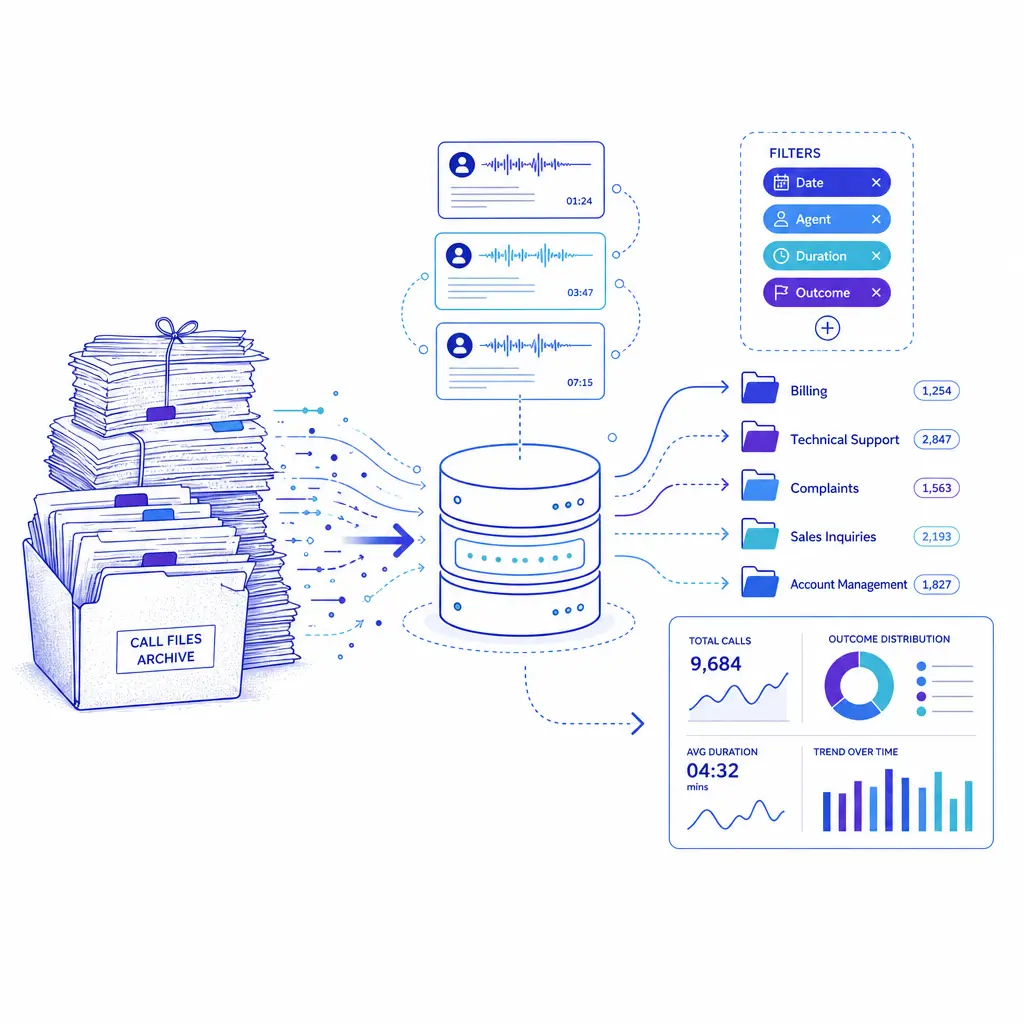
Recordings built for storage and dispute review become an operating dataset. Calls get transcribed, categorized, and searchable, so supervisors can find patterns in QA, coaching, intake quality, and follow-up instead of sampling a few calls by hand.
Call center speech analytics uses AI conversation transcription and call analytics to turn recorded or live customer conversations into structured data about who spoke, why they called, what happened, and which moments deserve QA review, coaching, compliance attention, or revenue action.
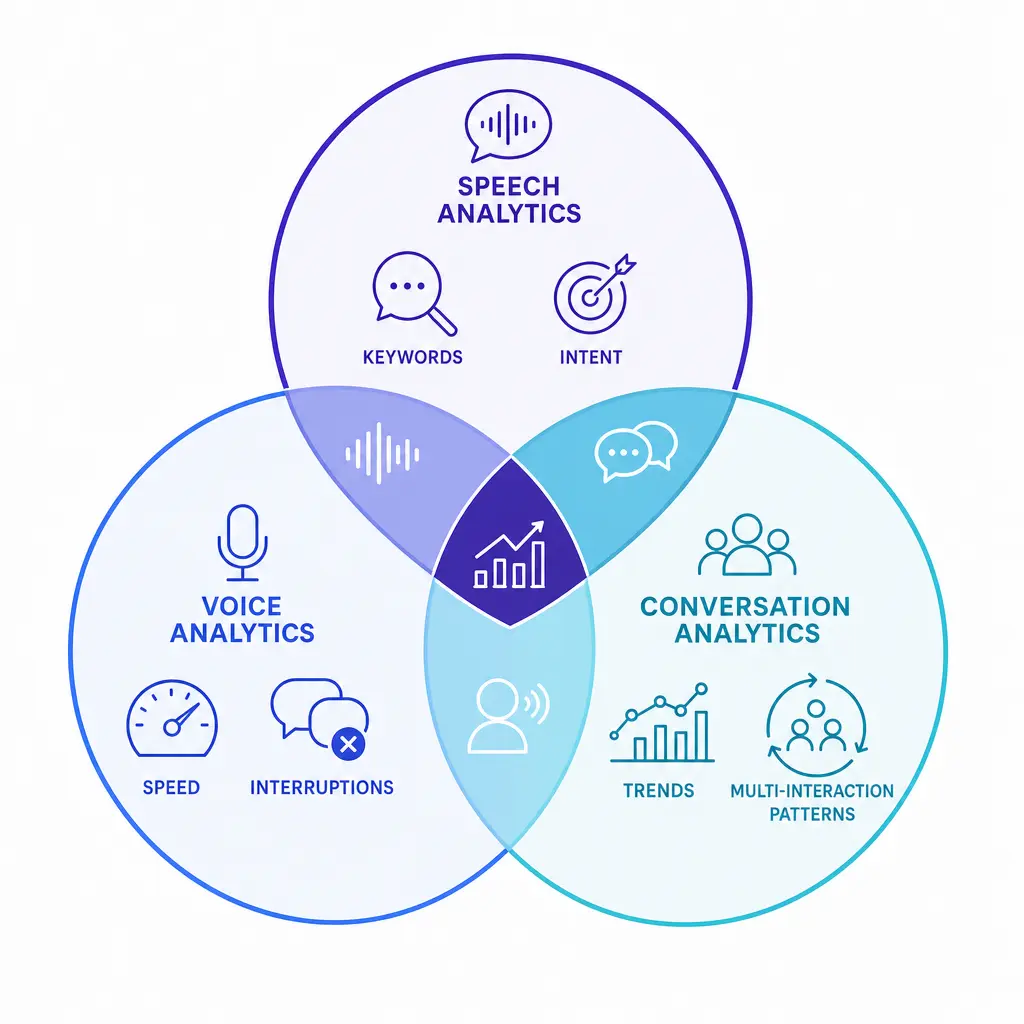
The terms overlap, but they are not identical. A clear internal definition helps prevent teams from buying software for one purpose and expecting a different outcome.
How it works in practice:
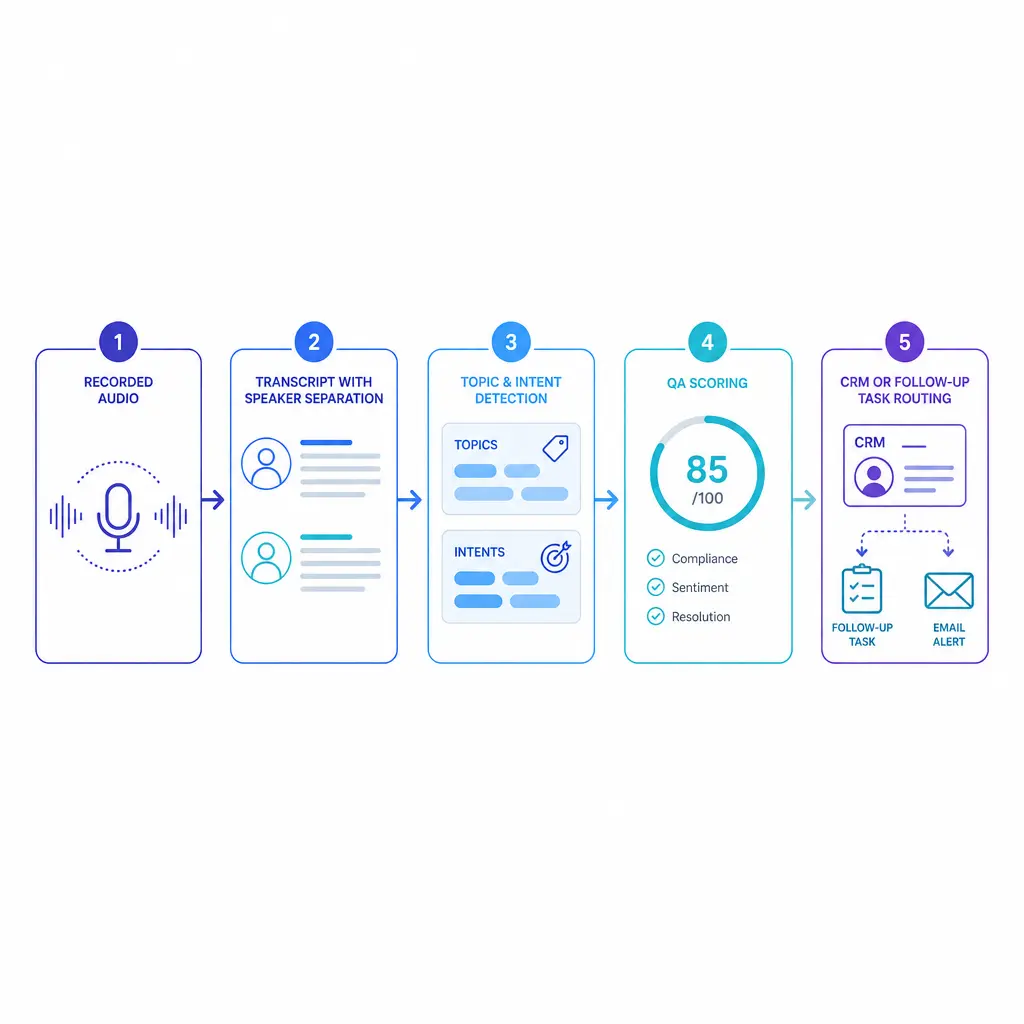
A five-step pipeline turns raw audio into action: record and ingest the call, transcribe and separate speakers, detect topics and intent, score the interaction, then route findings into coaching, QA review, CRM tasks, and follow-up workflows.
The first layer is reliable transcription. If product names, insurer names, clinic terminology, location names, matter types, or service vocabulary are transcribed poorly, every downstream category and score becomes less trustworthy.
This is why speech analytics software should be evaluated against your language, not a generic demo. A legal intake team needs case-type and urgency language recognized correctly. A healthcare scheduling team needs provider names, appointment terms, and symptom language handled consistently. A multi-location service brand needs location, service-line, and routing language captured accurately.
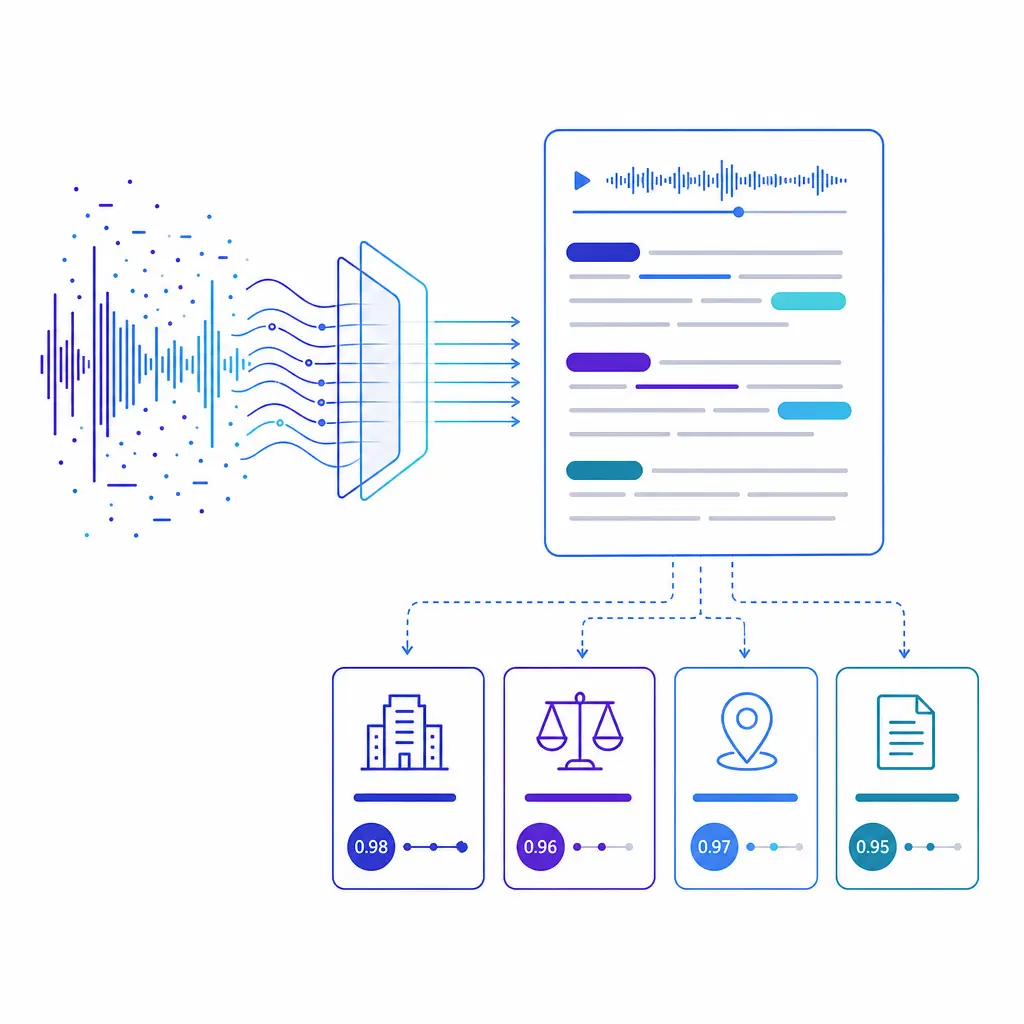
Everything downstream depends on transcription accuracy. Product names, location names, case types, and clinic terminology must be captured correctly, or categories and scores become less trustworthy. Evaluate any platform against your own call language, not a generic demo.
Searchable transcripts become far more useful when the system can distinguish speakers and organize calls into categories. Using conversation transcription together with tools built for contact center conversation insights and categorization lets teams filter conversations by call reason, branch, outcome, campaign, team, or escalation pattern instead of reviewing them one by one.
This is where recordings stop being an archive and start becoming an operating dataset. Supervisors can pull every call that mentioned a refund, every intake that never reached verification, every after-hours call routed twice, or every appointment request that ended without a booking attempt.
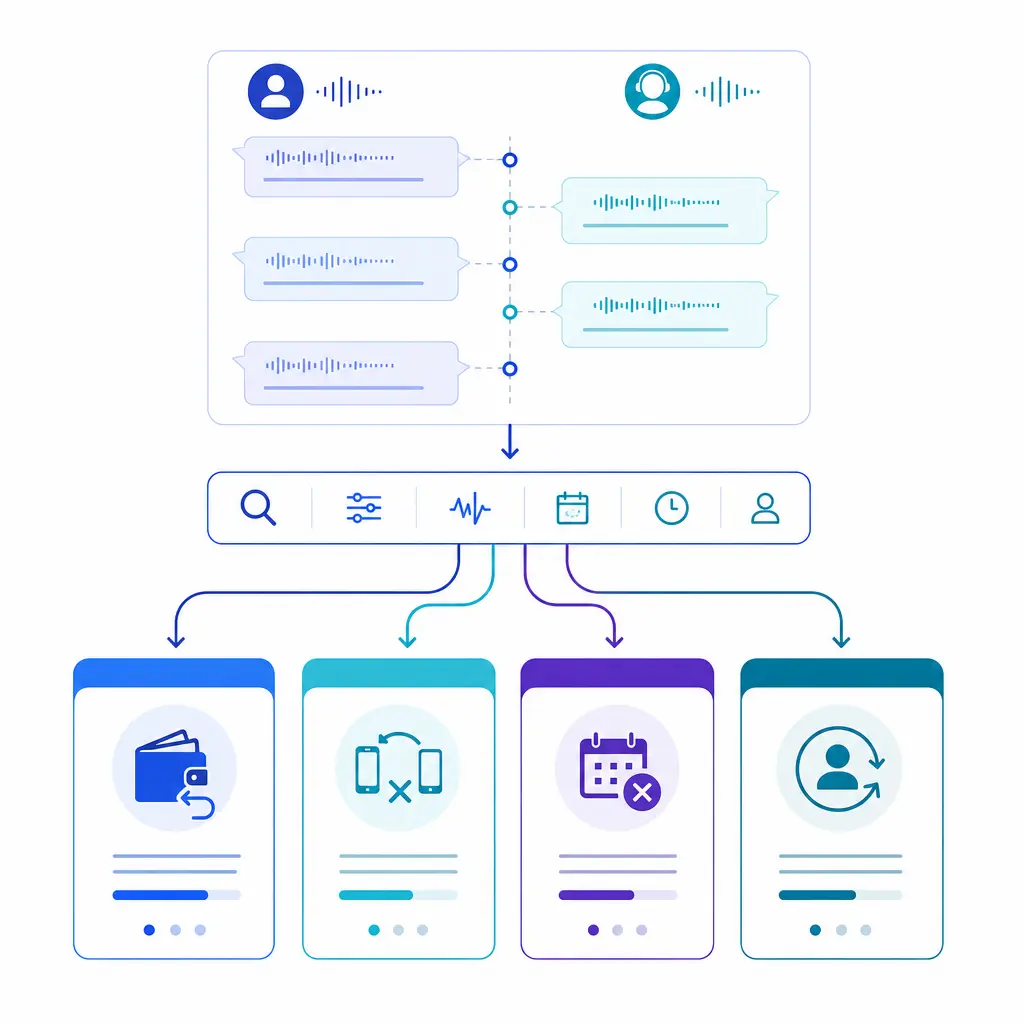
When agent and caller are separated into distinct lanes, transcripts become searchable. Supervisors can filter by call reason, outcome, or escalation pattern, such as every refund mention, unverified intake, or appointment request that ended without a booking attempt.
Keyword spotting alone is not enough. Strong call center speech analytics should help teams group language into intent, topic, and outcome buckets so they can distinguish routine scheduling from urgent service demand, serious legal intake from low-fit leads, and solvable billing friction from true churn risk.
The most useful categories are business categories, not abstract language labels. Good examples include booked, not booked, wrong transfer, repeat caller, no next step confirmed, price objection, follow-up promised, emergency escalation, disclosure missed, high-intent lead, or competitor mention. When categories map cleanly to decisions, the analytics become actionable.
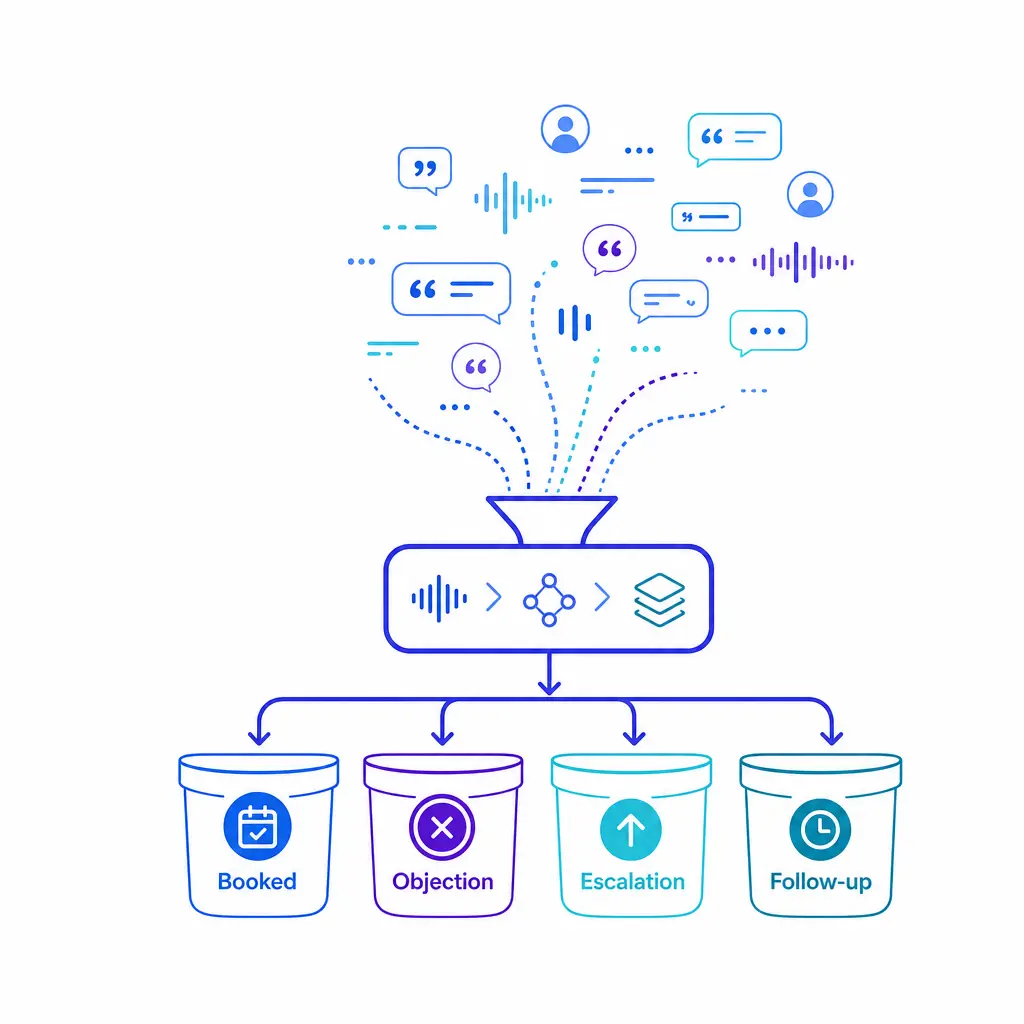
Strong analytics groups conversation fragments into business categories that map to decisions, such as booked, not booked, price objection, wrong transfer, follow-up promised, and emergency escalation, rather than relying on keyword spotting alone.
Call analytics measures such as sentiment, interruptions, talk speed, and non-talk time add context that a plain transcript can miss. An agent may technically follow the script while still sounding rushed, defensive, disengaged, or overly dominant in the conversation.
These signals work best as review prompts, not automatic judgments. A negative sentiment flag may reflect pain, fear, billing frustration, urgency, language barriers, or a genuinely poor interaction. Teams should treat sentiment and acoustic measures as indicators that help prioritize review, coaching, or retention outreach.
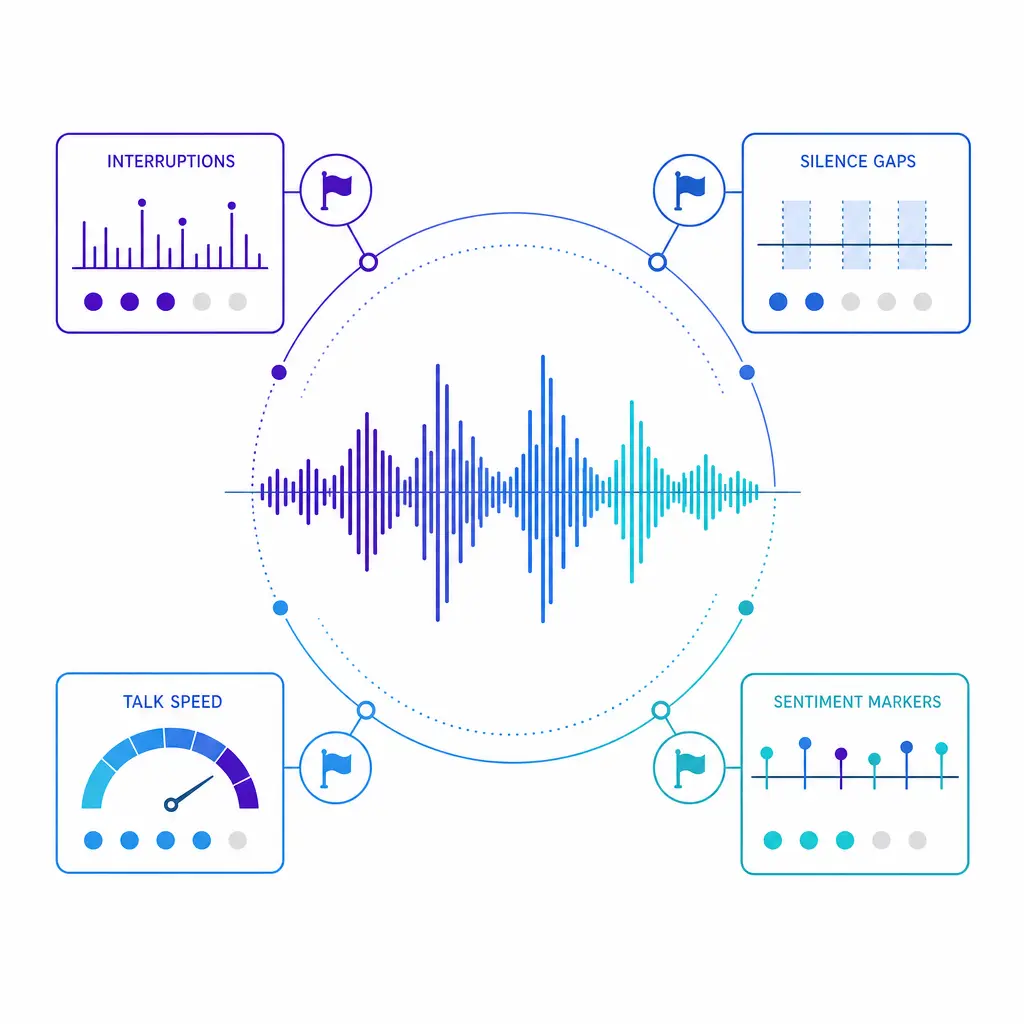
A waveform dashboard surfaces interruptions, silence, pace, and sentiment as review flags. These acoustic signals add context a transcript can miss, but they work best as prompts for human review and coaching, not automatic judgments about an agent.
Once categories are stable, the next step is automation. The goal is not to collect more data. The goal is to convert data into scorecards, alerts, and handoffs that tell the right team what needs attention now.
Examples include missed required disclosures, no appointment ask, weak verification, unresolved follow-up promises, repeated hold transfers, obvious purchase intent with no escalation, or a dissatisfied caller who should be routed to retention. The best programs keep the workflow simple: identify the signal, assign an owner, track the action, and measure whether the action changed outcomes.
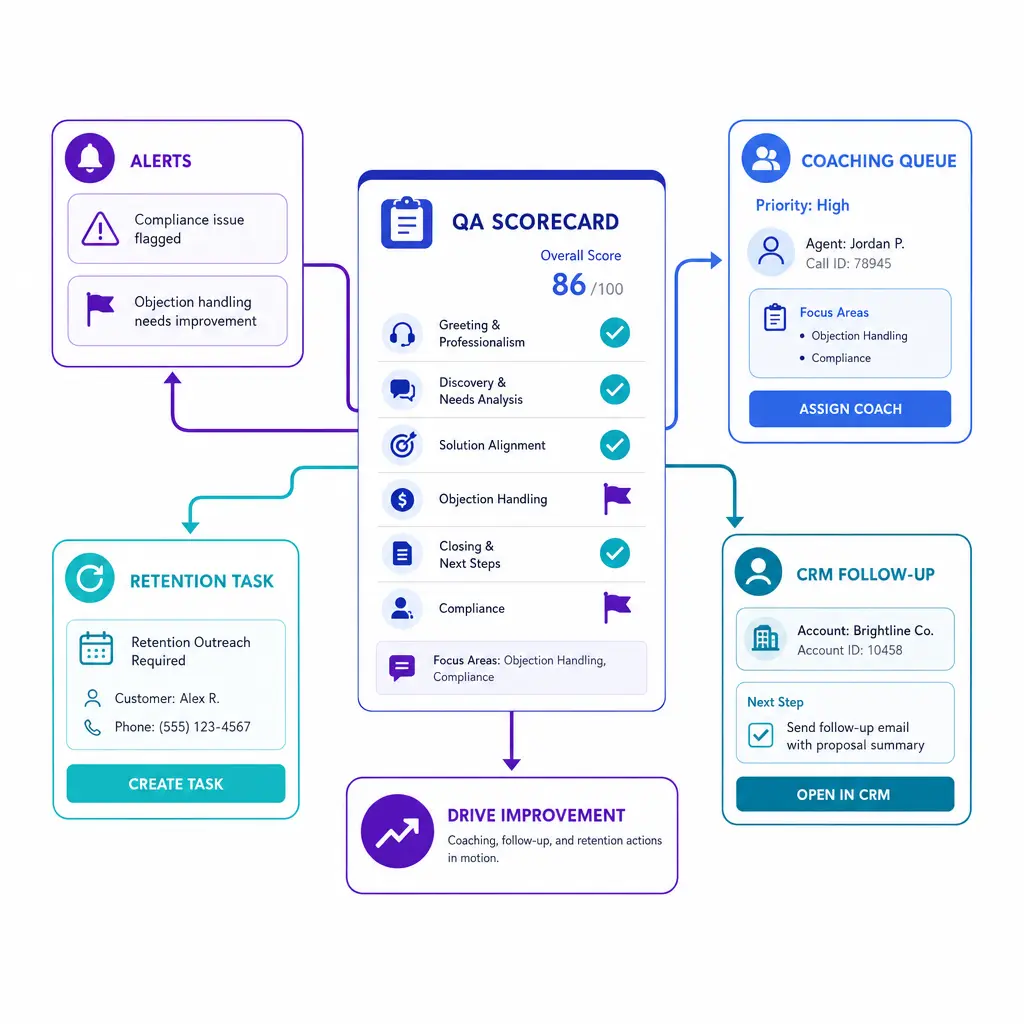
Once categories are stable, a QA scorecard can trigger alerts and route follow-up tasks into your connected systems. Identify the signal, assign an owner, track the action, and measure whether it changed outcomes.
QA improves fastest when the scorecard reflects the few behaviors that matter most to the business. If your current QA form is long, subjective, or disconnected from outcomes, speech analytics will only scale the confusion. Start with a short set of required behaviors and outcome checks.
Every operation has a few non-negotiables. These usually include a branded greeting, identity or account verification, required disclosures, and core script steps that protect compliance, consistency, or intake quality. Speech analytics should be configured to detect whether those moments happened and whether they happened in the right order.
This is especially important for legal intake, healthcare scheduling, and sales programs where the opening of the call shapes trust. If the team skips verification, fails to set expectations, or omits a required notice, the downstream call quality often suffers even when the caller stays engaged.
Not every quality issue is about missing a script line. Some of the biggest quality failures come from talking over callers, rushing through emotional moments, overusing hold, or filling silence instead of listening. These are the interactions that often create complaints, low conversion, or second calls.
Use speech and voice analytics call center signals to flag patterns such as frequent interruptions, long dead air, repeated hold events, or one-sided conversations. Then let human reviewers determine whether the behavior reflects poor call handling, a difficult call type, or a process design problem.
A call should not score well just because it sounded polite. It should score well because the caller left with a clear next step, accurate routing, a booked appointment, a documented escalation, or a realistic timeline for follow-up.
Look for signals tied to completion and clarity. Did the agent summarize the next step, confirm a callback window, capture the right intake details, explain what happens next, or transfer to the right queue? Did the call include language that should have triggered supervisor review, same-day response, or retention outreach?
Speech analytics becomes valuable when it strengthens coaching, not when it replaces it. Supervisors still need to review flagged calls, calibrate scoring standards, and separate agent behavior from process or staffing problems.
Build a simple cadence. Review a targeted sample of flagged calls each week, compare scorer decisions monthly, and use those findings to update scripts, knowledge-base guidance, routing rules, and onboarding materials. That creates a closed loop instead of a passive monitoring program.
Example QA scorecard for recorded calls:
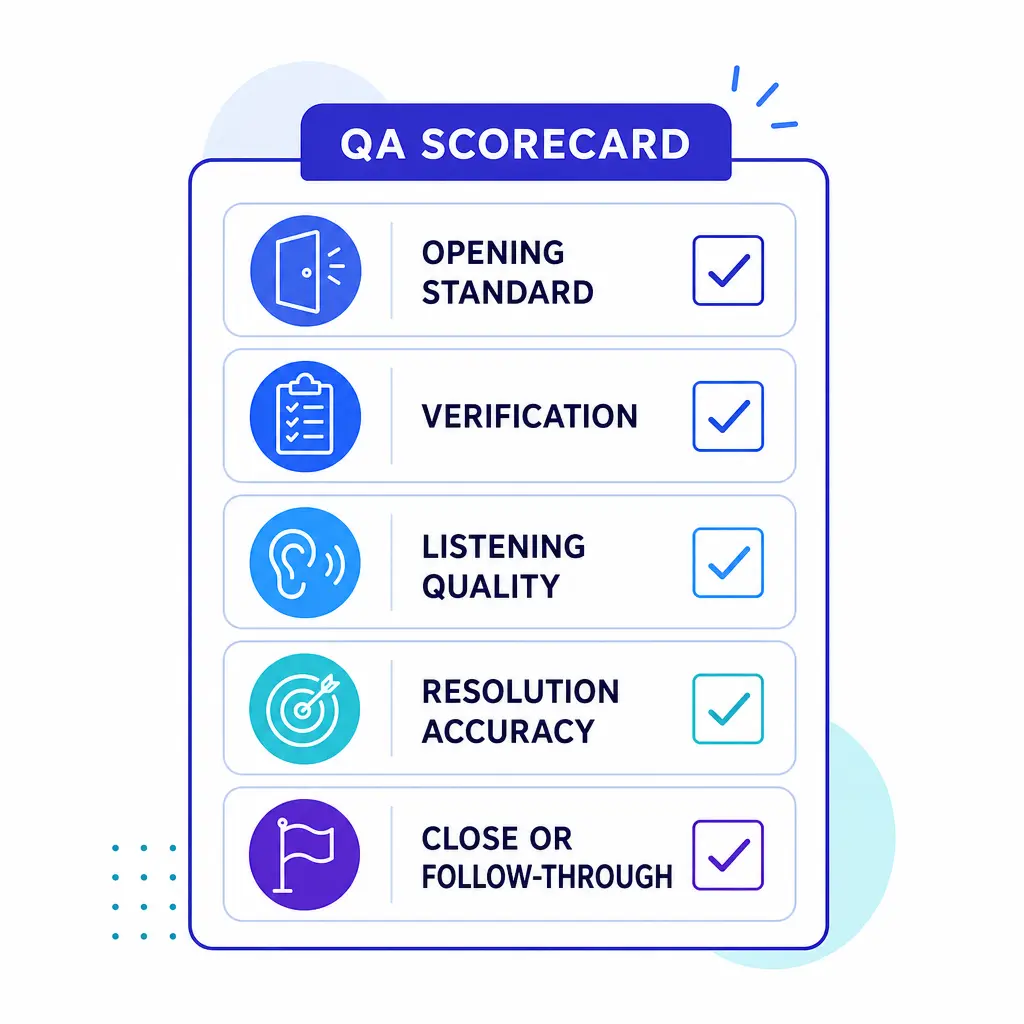
A short QA scorecard keeps reviewers focused on what matters: the opening and brand standard, verification and disclosures, listening quality, accuracy and resolution, escalation handling, and close and follow-through. A short set of required behaviors beats a long, subjective form.
Speech analytics should support a small KPI set instead of creating a parallel reporting universe. Keep the measures tied to service quality, operational efficiency, and revenue outcomes.
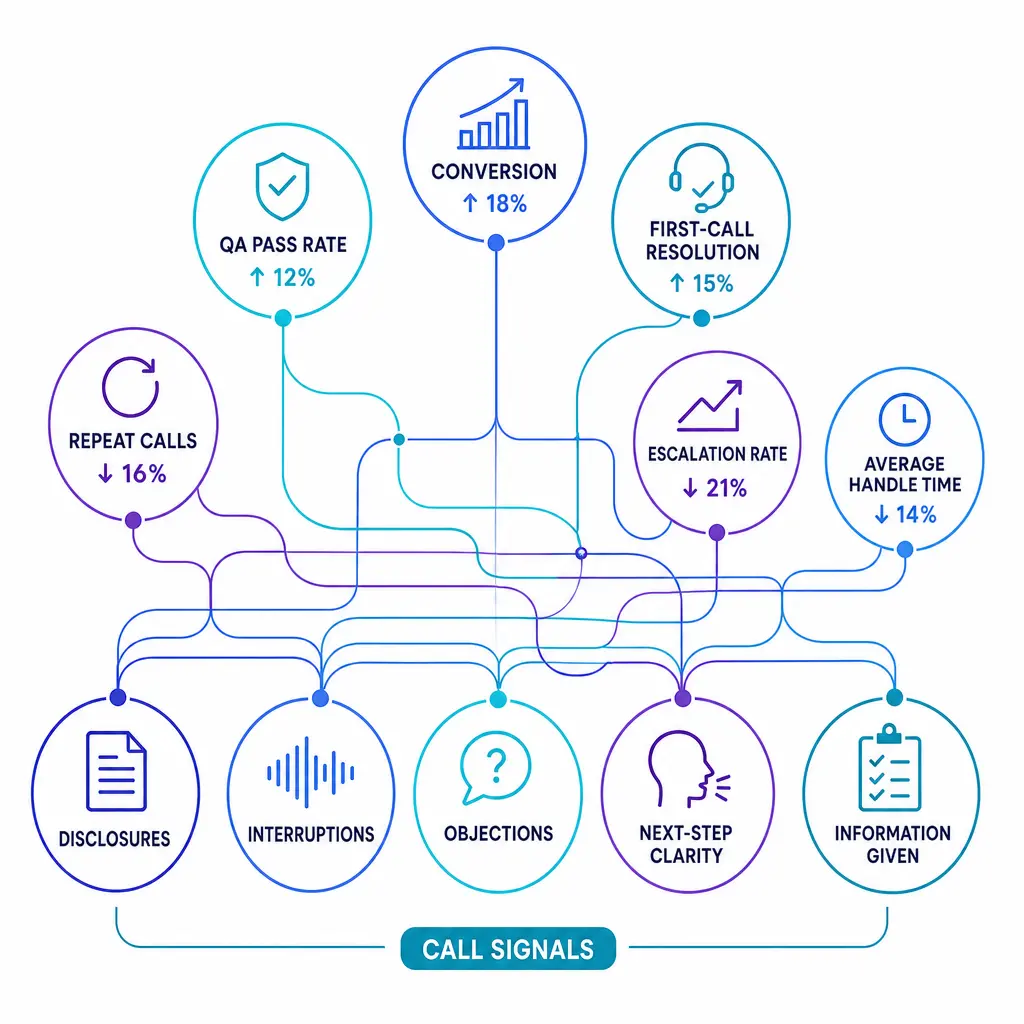
Pair speech analytics with a small KPI set instead of a parallel reporting universe: QA pass rate, conversion or appointment-set rate, first-call resolution, repeat call rate, escalation rate, and abandonment. Use average handle time carefully, never in isolation.
Most teams first approach speech analytics as a QA tool. That is useful, but incomplete. Recorded calls also contain strong revenue signals that can improve lead qualification, appointment booking, retention, upsell, and campaign feedback.
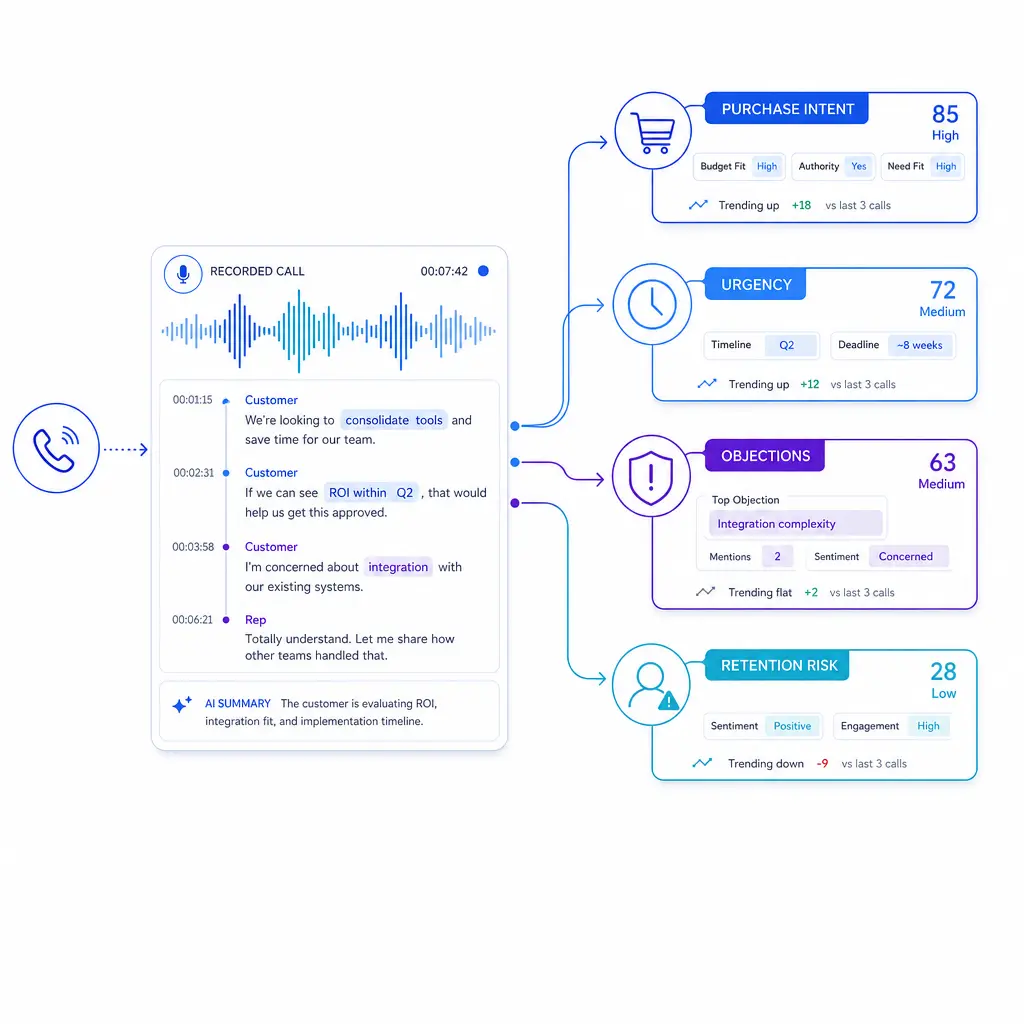
Recorded calls also carry revenue signals. Intent, urgency, objections, and retention cues can improve lead qualification, appointment booking, retention, upsell, and campaign feedback when teams tag them and compare them to outcome data.
High-intent callers often reveal themselves in specific ways. They ask about timing, availability, next steps, same-day service, financing, insurance use, documentation, or who else needs to be present for the decision. In legal intake, urgency language may signal a hot lead or a time-sensitive matter. In healthcare, it may signal a motivated patient who needs fast scheduling.
Tag these cues and compare them to outcome data. If calls with clear urgency or decision-maker language still fail to convert, the issue is usually not lead volume. It is script discipline, transfer design, after-hours handling, intake completeness, or confidence in the close.
Recorded calls show where the sale or booking process breaks down. Common friction themes include price objections, trust concerns, unclear availability, weak explanation of value, insurance confusion, competitor comparisons, and long hold or transfer experiences.
Analytics helps teams quantify those patterns instead of relying on anecdotes. That lets operations, sales, and marketing see whether non-conversion is mostly a lead-quality problem, a staffing problem, a messaging problem, or an execution problem on the phone.
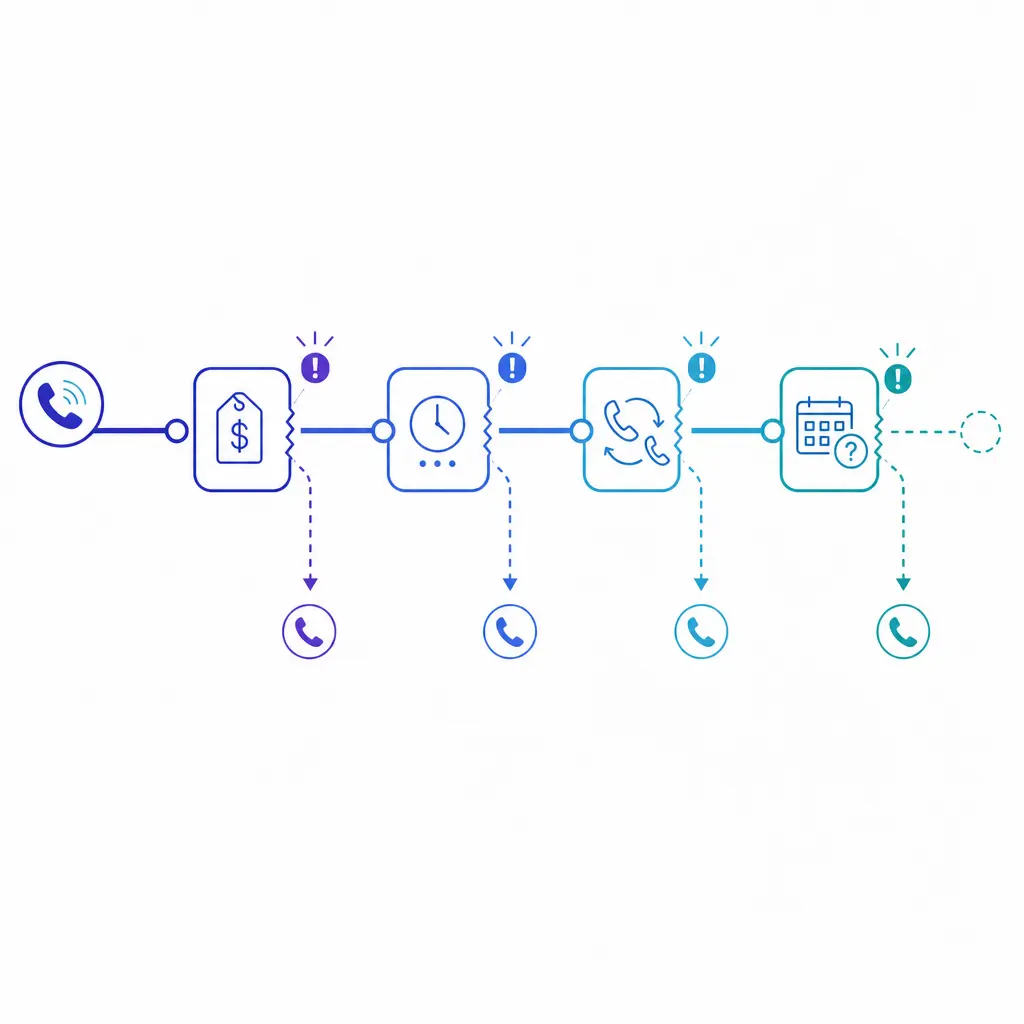
A call path can break at pricing, transfers, or an unclear next step. Quantifying these friction points shows whether lost demand is a lead-quality, staffing, messaging, or execution problem on the phone, instead of relying on anecdotes.
Many inbound programs miss growth opportunities because agents are focused only on closing the initial request. Search for language that signals adjacent demand, such as add-on services, premium scheduling options, follow-up care, bilingual assistance, multiple locations, or bundled service needs.
The important point is not aggressive selling. It is making sure agents recognize legitimate opportunities when the caller already shows interest and fit. In enterprise environments, that often improves revenue without increasing media spend.
Some of the highest-value signals come from unhappy callers who have not left yet. Look for apology loops, repeated explanations, cancellation language, refund requests, competitor mentions, service-failure stories, or phrases that suggest broken expectations.
Those calls should rarely end inside a generic QA report. They should trigger recovery workflows, manager review, or retention outreach. When handled quickly, speech analytics can help reduce preventable revenue loss and protect brand trust.
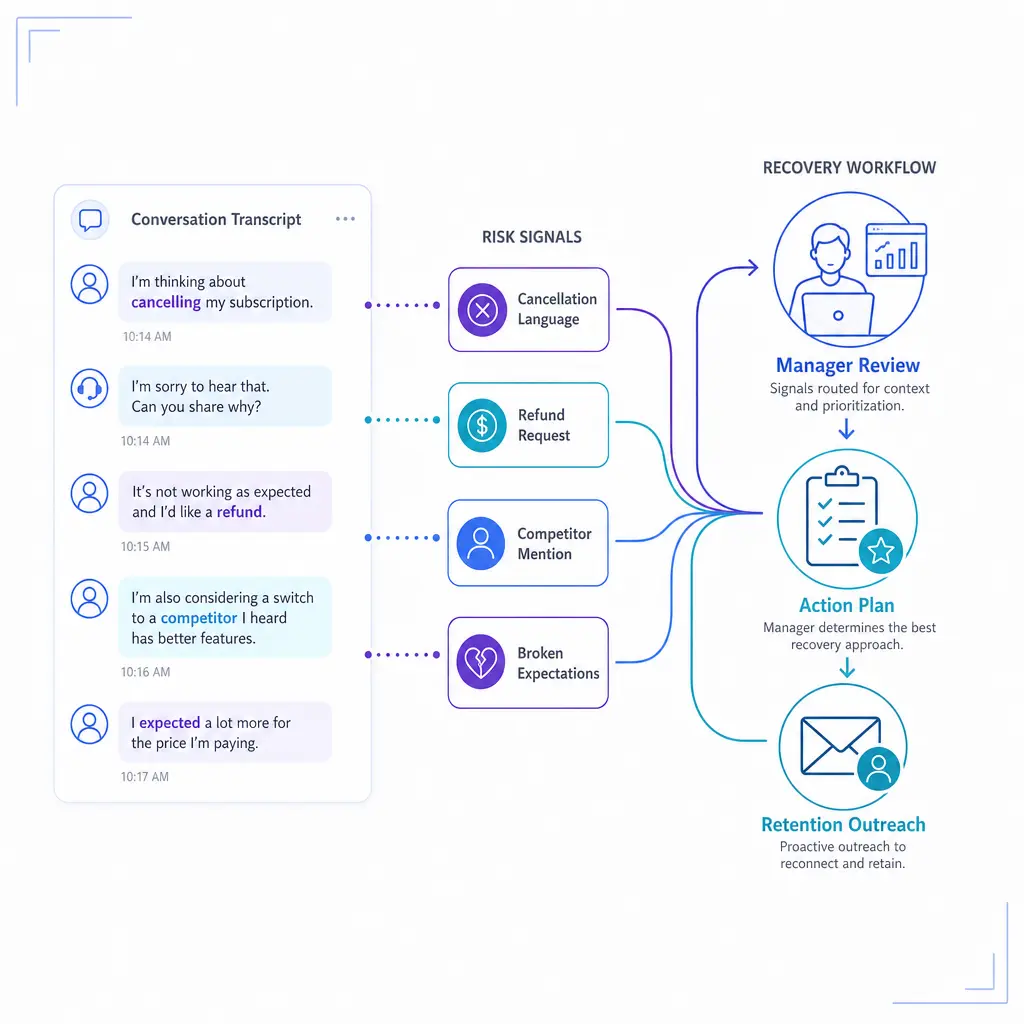
Cancellation language, refund requests, and repeated explanations signal unhappy callers who have not left yet. These calls should trigger a recovery workflow, manager review, or retention outreach, not end inside a generic QA report.
Calls are one of the fastest ways to validate whether campaign messaging matches what prospects actually expect. If callers keep asking for a service you do not offer, misunderstanding pricing, or referencing an offer your team cannot fulfill, the problem may start before the phone rings.
This is why conversation analytics should not live only inside the contact center. Marketing can use it to refine messaging, sales can use it to sharpen qualification, and operations can use it to redesign scripts and routing.
Both models have value, but they solve different problems. Real-time analytics helps during the conversation. Post-call analytics helps after the conversation, when you want broader review, trend detection, QA scoring, and pattern analysis across many calls.
Use real-time analysis when an in-call prompt can change the outcome. This is useful for required disclosures, escalation support, objection handling, supervisor assist, and live appointment or intake guidance. The tradeoff is that real-time workflows demand tighter scripting, tighter operations, and fast ownership on the floor.
Use post-call analytics when the goal is pattern detection, scorecards, training, compliance review, conversion analysis, or root-cause work across large call sets. It is usually the better starting point because it is easier to validate, easier to calibrate, and less disruptive to launch.
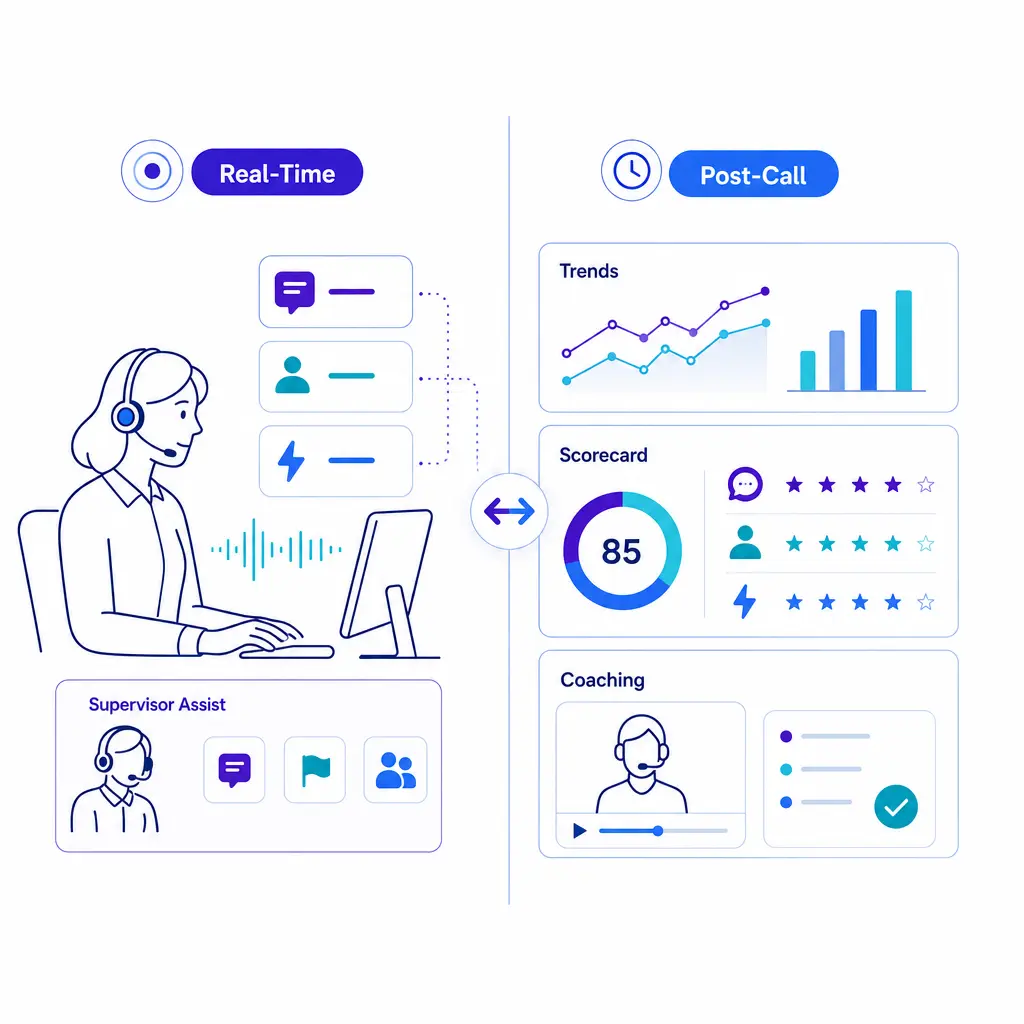
The best speech analytics software is not the one with the longest feature list. It is the one that matches your vocabulary, your call types, your QA model, and your required actions after a signal appears.
Start with accuracy on your real calls. Test accents, noisy lines, after-hours calls, bilingual interactions, product names, branch names, legal terminology, and healthcare vocabulary. If the transcript layer is weak, the rest of the analytics stack will produce fragile insights.
Off-the-shelf categories are rarely enough. You need the ability to define custom call reasons, escalation triggers, revenue cues, and QA rules that match your operation. Strong speech analytics software should let you turn these into scorecards, thresholds, and exception alerts without a long services project.
Do not buy a tool that assumes automation is the whole answer. Review queues, calibration workflows, comment histories, and exception handling matter because managers still need to confirm findings, coach agents, and refine categories over time.
Insights lose value when they stop at a dashboard. Look for practical integrations that let you push summaries, dispositions, lead-quality tags, or follow-up tasks into the systems your teams already use. The signal should move to the work, not the other way around.
For healthcare workflows that involve protected data, controls should align with the HIPAA Security Rule's administrative, physical, and technical safeguards. In practice, that means role-based access, auditability, retention discipline, and clear handling standards for recorded calls and transcripts.
If your team sells by phone, script monitoring should map to Telemarketing Sales Rule disclosure requirements and related compliance obligations, not just courtesy standards. Legal intake teams and other sensitive environments should apply the same discipline: least-privilege access, intentional retention, and reviewable processes around who can hear, export, or analyze recordings.
Choose reporting that answers business questions, not just technical ones. Can you show whether a missed disclosure predicts complaints, whether empathy scores correlate with booked appointments, whether specific objections reduce conversion, or whether certain campaigns create low-fit calls? If not, the reporting layer is probably too shallow.
The best platform depends on your operating model. For an enterprise or outsourced environment, the right choice is usually the one that combines solid transcription, customizable categories, clear QA workflows, security controls, and practical integrations with your CRM and call stack. If a tool cannot support your actual review process and downstream actions, it is not the best speech analytics software for your team, no matter how strong the demo looks.
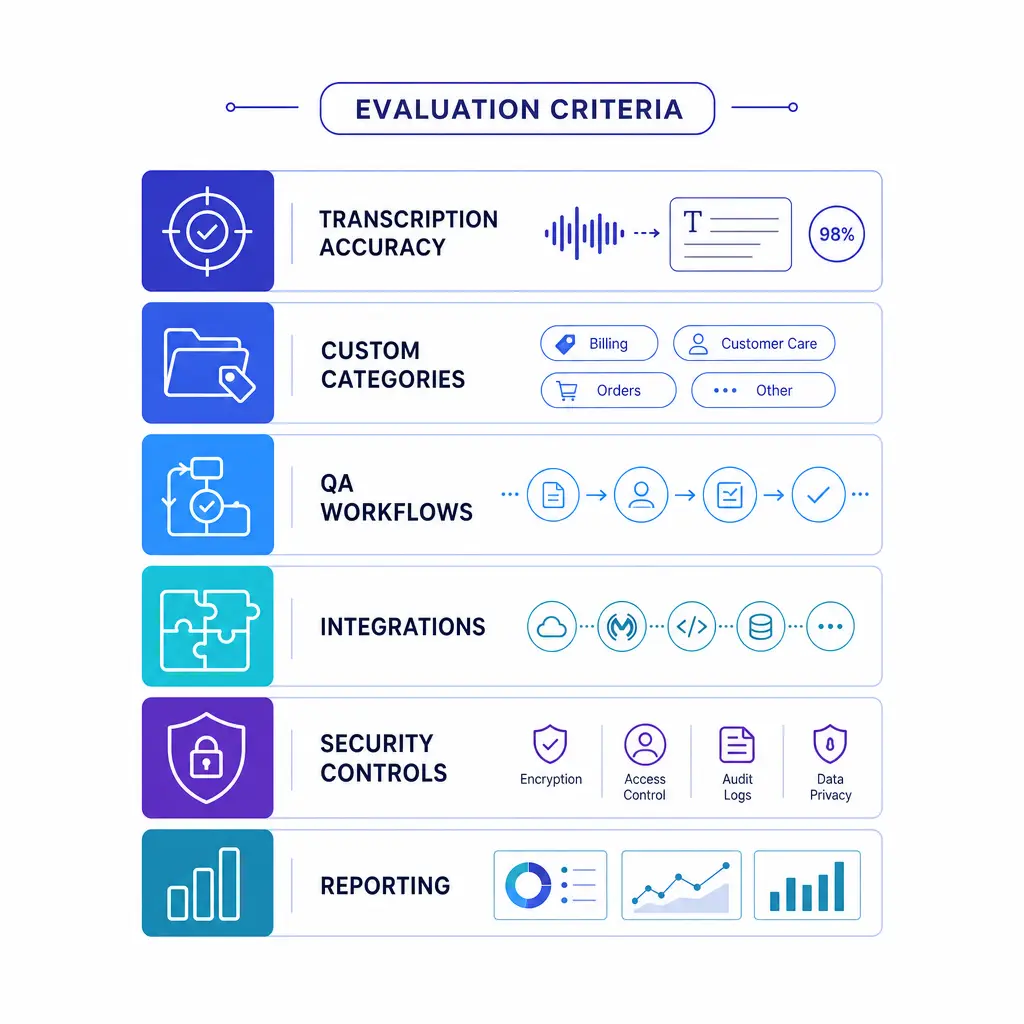
Evaluate software on what it must do after a signal appears: transcription quality on your vocabulary, custom categories and alerts, QA review workflows, CRM and reporting integrations, and security, retention, and consent controls.
Begin with a single problem that leadership already cares about. Examples include missed appointment opportunities, poor after-hours intake quality, repeat billing calls, weak escalation handling, low conversion on high-intent leads, or script drift in regulated workflows.
This keeps the rollout grounded. You are not “doing AI.” You are solving a measurable business problem with recorded-call analysis.
Write down the categories you want the platform to detect and what each category actually means. Then create a human review step to validate the findings against a sample of real calls before anyone treats the output as truth.
That validation step is where good programs separate real insights from noisy ones. It also prevents leaders from making policy changes based on misread patterns.
Use a call sample that reflects reality, not only your cleanest or highest-volume queue. Include day and night coverage, simple and complex calls, different locations, different agent groups, and the call types that produce the most downstream cost or revenue impact.
The pilot should answer practical questions. Which categories are accurate enough to trust? Which ones need tuning? Which alerts create real action? Which ones just generate noise?
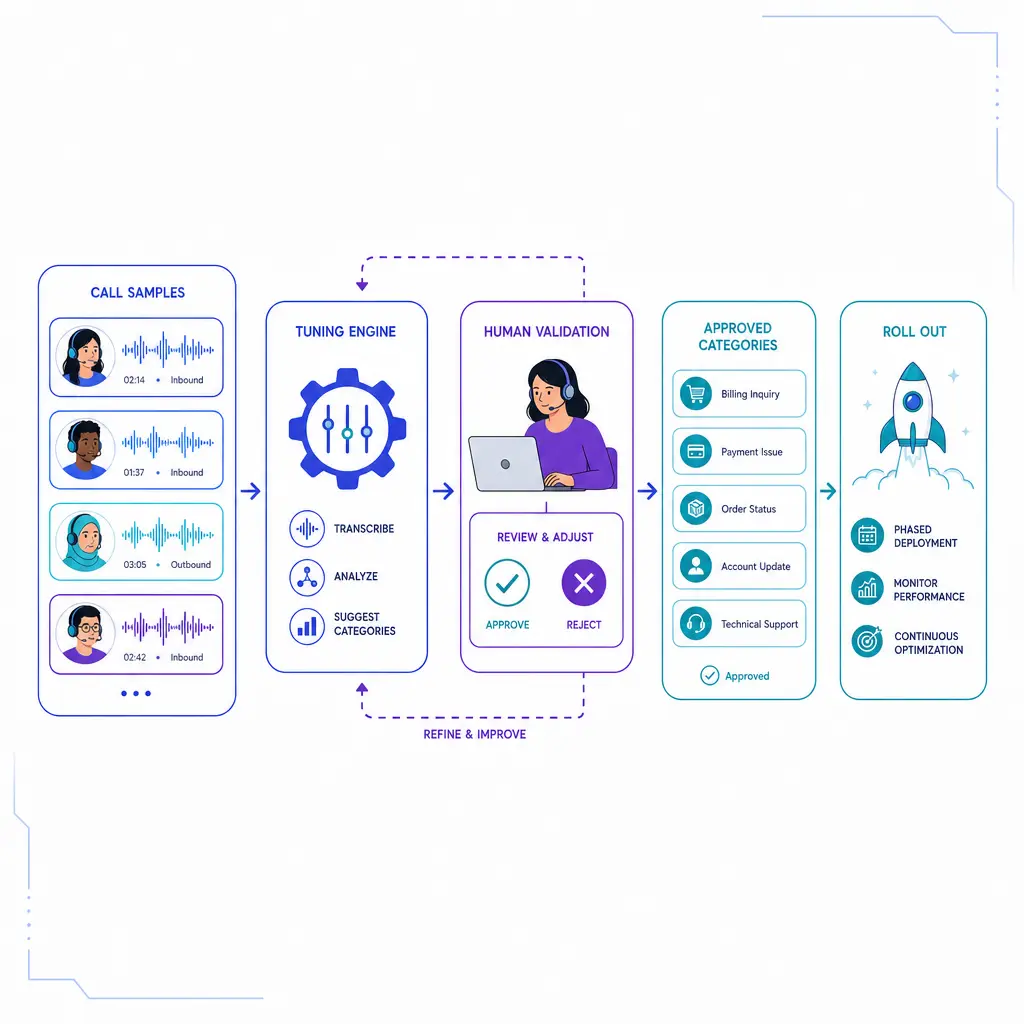
Pilot with a representative call sample, including day and night coverage, simple and complex calls, and different locations. Use human review to confirm accuracy, tune categories, and decide which alerts create real action and which just generate noise.
Analytics becomes shelfware when nobody owns the action after a signal appears. Assign each major signal to an owner. QA owns script and behavior issues, operations owns routing and staffing issues, sales owns conversion patterns, and marketing owns expectation-setting and lead-quality themes.
This is especially important in multi-location organizations where the same caller experience can break across several teams. Ownership keeps the work from disappearing into a generic reporting queue.
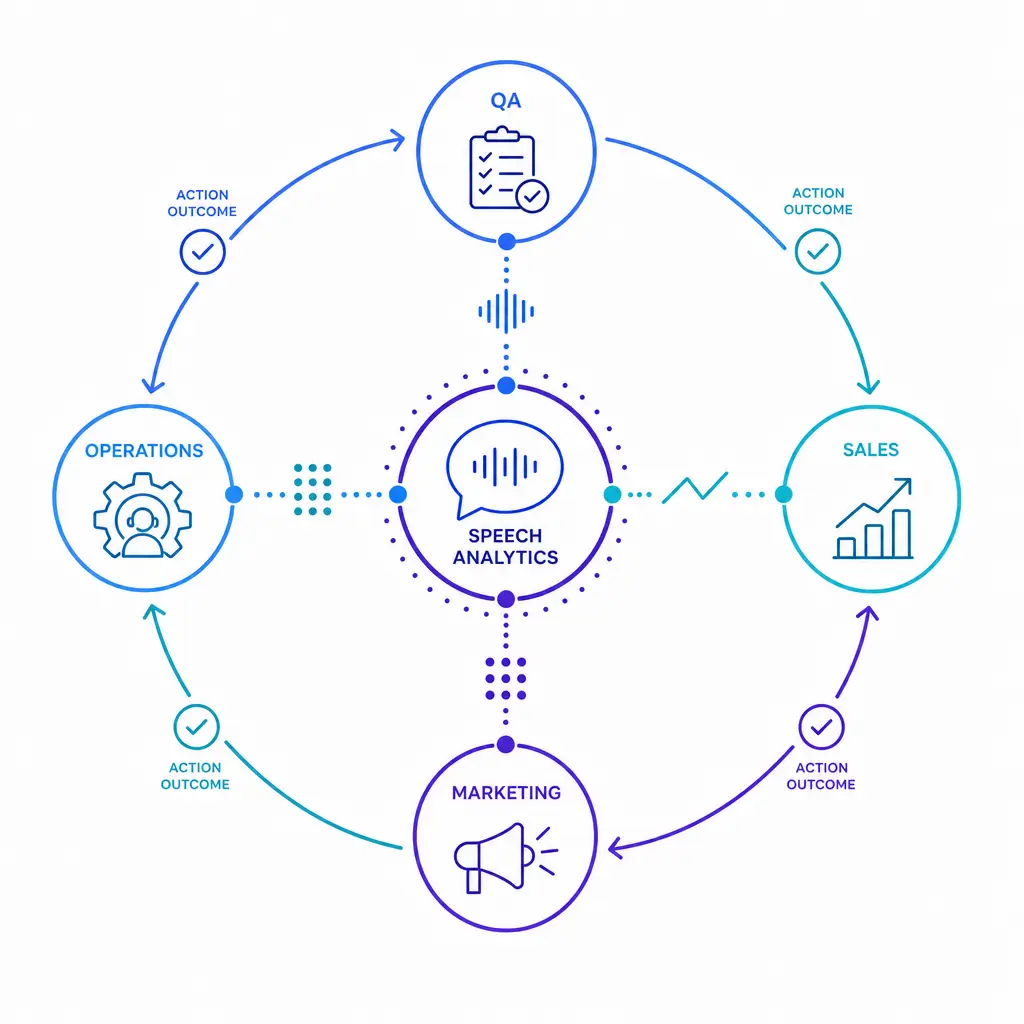
Analytics becomes shelfware when nobody owns the action. Assign each signal an owner: QA for script and behavior issues, operations for routing and staffing, sales for conversion patterns, and marketing for expectation-setting and lead quality.
Models, scripts, and customer language all change over time. Review whether the categories still reflect current demand, whether certain accents or call types are being misread, and whether actions taken from the findings are actually improving outcomes.
A simple operating rule helps: if a dashboard does not lead to a decision, a workflow, or a coaching change, it should be simplified or removed.
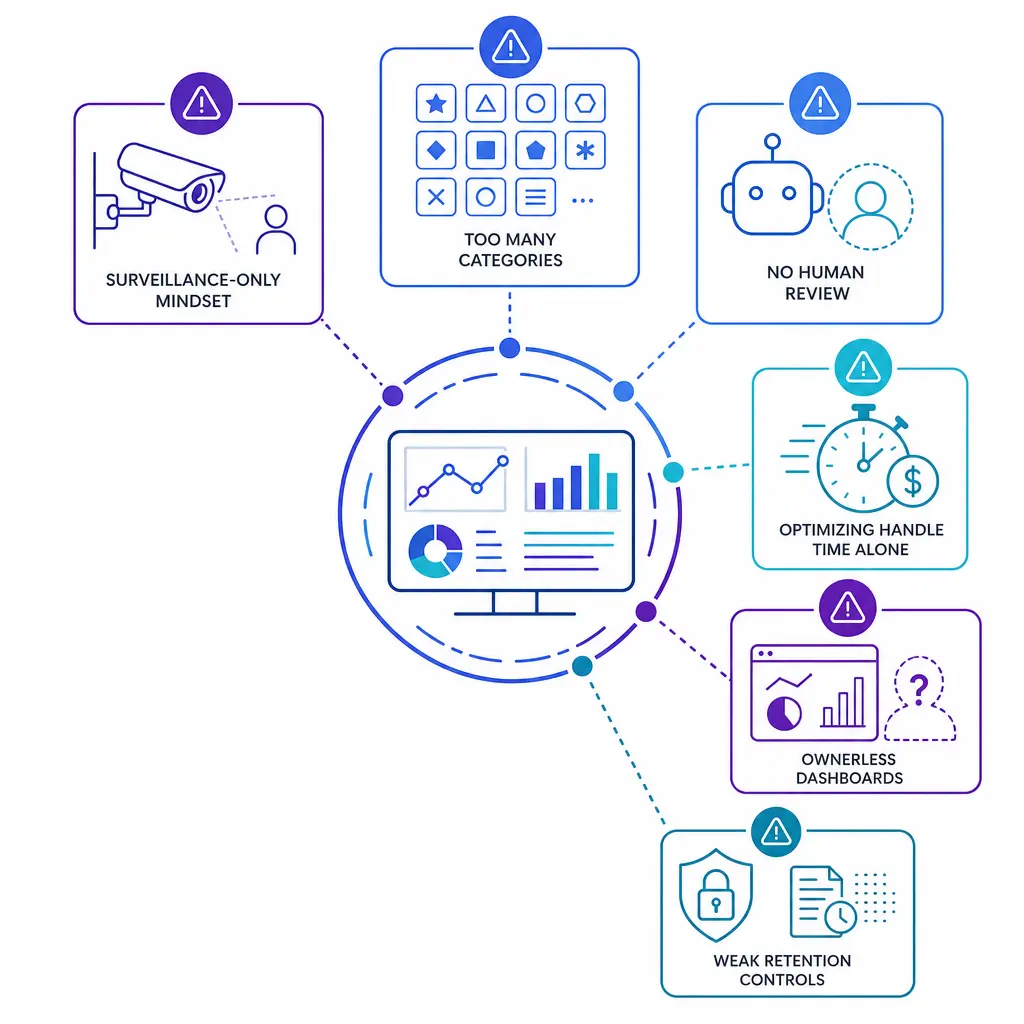
Common pitfalls include treating speech analytics as surveillance only, starting with too many categories, adding dashboards without owners, trusting automation without human review, optimizing handle time at the expense of resolution, and ignoring access and retention discipline.
It is the practice of using recorded or live call data to identify intent, topics, quality issues, compliance events, and revenue opportunities. In operational terms, it helps teams turn conversations into repeatable actions for QA, coaching, routing, and follow-up.
Speech analytics focuses more on what was said, such as keywords, topics, intent, and script events. Voice analytics focuses more on how the call sounded, including pacing, interruptions, silence patterns, and sentiment-style cues. Most modern platforms blend both.
The most useful core KPIs usually include QA pass rate, conversion or appointment-set rate, first-call resolution, repeat call rate, escalation rate, abandonment, service level, and average handle time. The right mix depends on your business model, but outcome quality should always sit beside efficiency.
Yes, when the program is designed around revenue signals rather than generic monitoring. It can help teams identify purchase intent, failed closes, objection patterns, retention risk, lead-quality issues, and missed upsell opportunities, then route those findings into coaching or follow-up workflows.
In operations discussions, the phrase usually refers to a service-level shorthand rather than a speech analytics metric. Whether that benchmark makes sense for your team depends on call urgency, abandonment tolerance, staffing economics, and the customer experience you are trying to deliver.
If your team needs more than basic call coverage, the next step is building an operating model that can act on what the calls are telling you. Go Answer can help service organizations connect live answering, overflow coverage, intake quality, QA workflows, and follow-up discipline so recorded-call insights do not stop at a transcript.
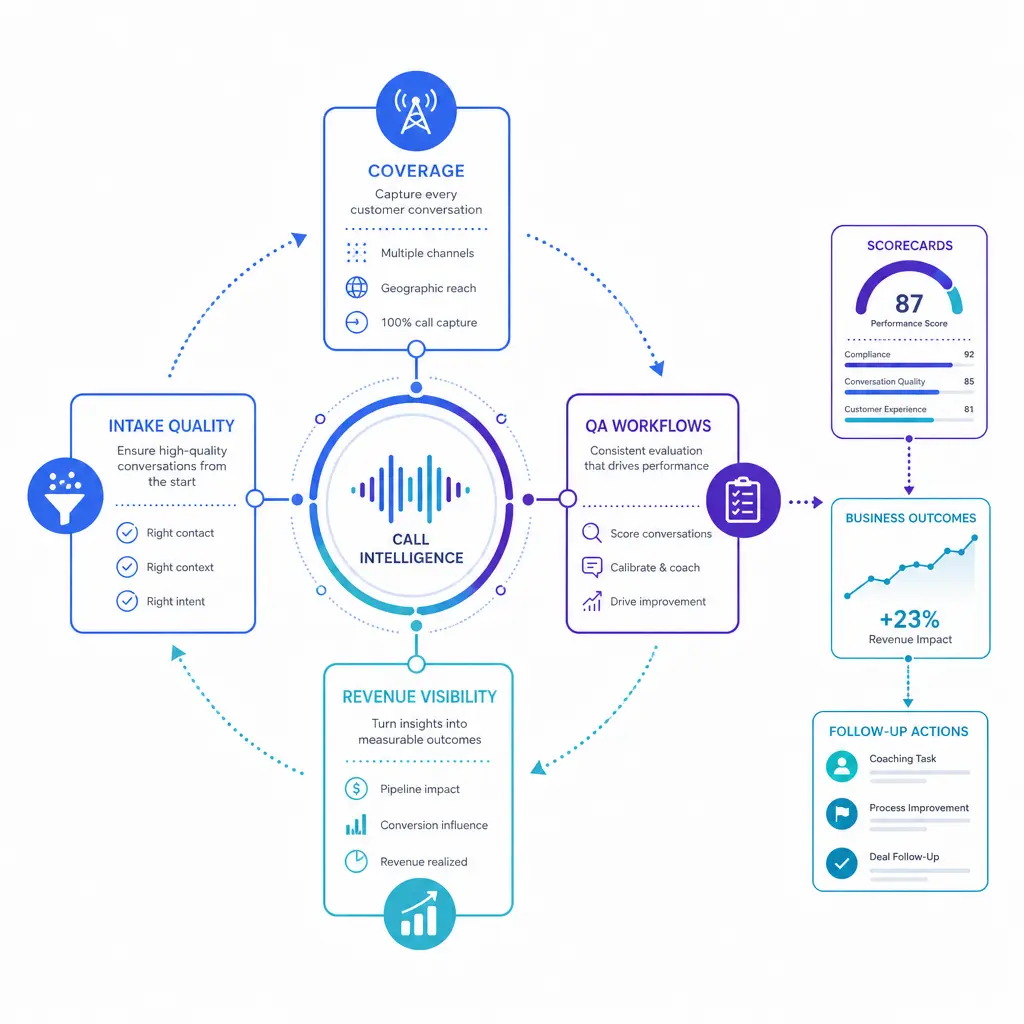
A unified operating model links call coverage, intake quality, QA workflows, and revenue visibility. When live answering, overflow coverage, and follow-up discipline work together, recorded-call insights do not stop at a transcript.
You can Request Pricing or Book a Discovery Call to review your call flows, QA goals, coverage gaps, and reporting needs. If you want a quick overview first, See How It Works and decide whether a more structured answering and intake model fits your operation.

Learn why thousands of companies rely on Go Answer.
Try us risk-free for 14 days!
Enjoy our risk-free trial for 14 days or 200 minutes, whichever comes first.
Have more questions? Call us at 888-462-6793
Learn why thousands of companies rely on Go Answer.
Have more questions? Call us at 888-462-6793
If you would like to get in contact with a Go Answer representative please give us a call, chat or email.

Thanks for your interest!
A representative will be reaching out to you shortly.
Have more questions? call us on 888-462-6793
